

1.conftest.py 文件介绍
1. 什么是 conftest.py?
conftest.py是一个专门用于存放fixture的文件,允许你把常用的前置条件代码集中在一个地方,供多个测试文件共享。这样你就不需要在每个测试文件中重复编写相同的前置代码。
2. conftest.py 的基本特点:
文件名必须是
conftest.py:这个文件名是固定的,不能更改。如果你改了文件名,Pytest 就无法自动识别这个文件中的fixture。不需要导入:你不需要手动导入
conftest.py,Pytest 会自动加载并识别其中的fixture。所以你在测试文件中直接就可以使用它定义的fixture。作用范围:如果将
conftest.py放在项目的根目录下,那么所有测试文件都可以访问其中的fixture。如果把它放在某个子文件夹下,那么它只对该文件夹内的测试用例生效。
2.fixture 简单应用
语法
@pytest.fixture(scope ="function",params=None,autouse=False,ids=None,name=None)
fixture里面有个scope参数可以控制fixture的作用范围,scope:有四个级别参数"function"(默认),"class","module","session
params:一个可选的参数列表,它将导致多个参数调用fixture功能和所有测试使用它。
autouse:如果True,则为所有测试激活fixture func可以看到它。如果为False则显示需要参考来激活fixtureids:每个字符串id的列表,每个 字符串对应于params这样他们就是测试ID的一部分。如果没有提供ID它们将从params自动生成
class TestDemo01():
    @pytest.mark.usefixtures('init_function03')
    def test_demo01(self):
        num = 1+1
        assert num == 2,"断言失败"
        print("success")       name:fixture的名称。这默认为装饰函数的名称
conftest.py:
import pytest


@pytest.fixture(scope='function')
def init_function01():
    print("方法级别的前置01")
    yield
    print("方法的后置01")


@pytest.fixture(scope='function')
def init_function02():
    print("方法级别的前置02")
    yield
    print("方法的后置02")

@pytest.fixture(scope='function')
def init_function03():
    print("这是方法前置03!")
    num =  1+1
    yield num
    print("这是方法后置 03")
3.fixture前置传参
当前置操作中产生的返回值需要被用例使用,需要用到前置传参。如在web自动化中可以将driver浏览器对象写入前置并传入测试用例中使用。我们在定义前置函数时可以用yield关键字返回参数,供测试用例方法使用。
conftest.py
@pytest.fixture(scope='function')
def init_function03():
    print("这是方法前置03!")
    num =  1+1
    yield num
    print("这是方法后置 03")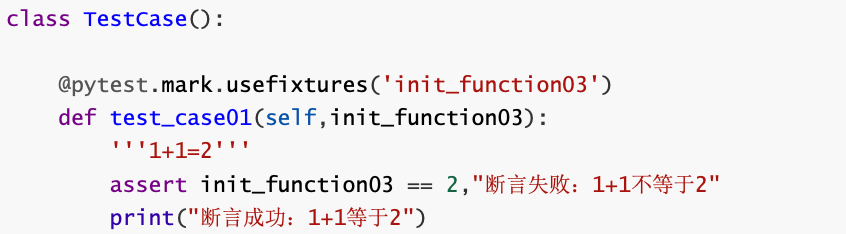
Web:
例如,在 conftest.py 中定义一个获取 token 的 fixture:
import pytest
import requests

@pytest.fixture(scope="session")
def get_token():
    # 模拟获取token的接口请求
    response = requests.post("https://api.example.com/login", data={"username": "user", "password": "pass"})
    return response.json()['token']
然后,在你的测试用例中使用这个 fixture:
def test_api(get_token):
    # 使用获取的token进行接口测试
    response = requests.get("https://api.example.com/data", headers={"Authorization": f"Bearer {get_token}"})
    assert response.status_code == 200